3D view
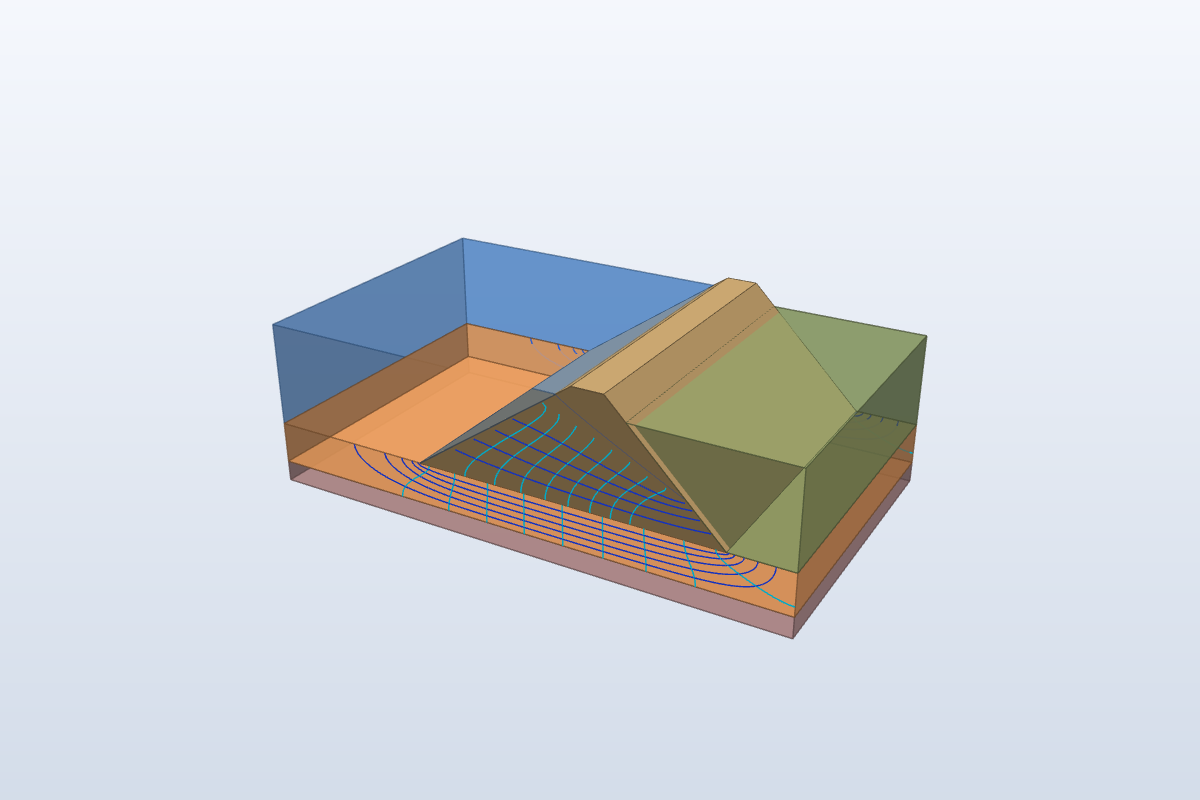
The 3D view button (Home tab, Out group, and Tools tab) opens the three-dimensional model of the dam built from the same data as the section: the drawing section is extruded along the embankment axis.
Contents
| Layer | Content |
|---|---|
| Dam body | the trapezoidal embankment (crest, upstream and downstream faces) |
| Stratigraphy | the two foundation layers with their colours and, when the downstream ground level is above the toe, the downstream ground up to that level |
| Reservoir | the water up to the maximum reservoir level (semi-transparent) |
| Phreatic line | the phreatic surface inside the dam body, from the reservoir level on the upstream face to the exit point on the downstream face |
| Flow net | equipotentials (light blue) and flow lines (blue) on the two end faces, in the dam body and in the permeable foundation layer |
Each layer is switched on and off with its button in the window toolbar.

Commands
- Length (m): length of the dam stretch shown (by default the embankment base, at least 20 m).
- Axonometric, Section, Side, Plan, Extents: predefined views.
- Perspective, Edges: projection type and face edges.
- Transparent structure: makes the dam body transparent to see the phreatic line and the flow net.
- Soil transparency: transparency of the foundation layers.
- Save image, Copy: image of the current view.
- Mouse: left = rotate, right or middle = pan, wheel = zoom, double click = extents.
The window updates itself when the data change (geometry, stratigraphy, permeability), keeping the chosen view and layers.
In the calculation report
The Report ends with the section drawing and an image of the 3D view.
© Geostru