Input of the micropiles
The environment for the micropiles input management is the following:

Reference diagram for the definition of the micropiles geometry
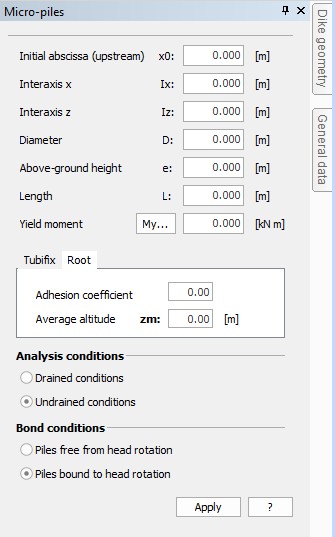
Environment for the insertion of the micropiles data
The data to be entered are the following:
-
Initial abscissa (x0): It is the abscissa in whose correspondence the micropile must be inserted. It is inserted starting from upstream (the thrusting side) and is expressed in m;
-
Spacing distance x (Ix): It is the spacing distance between the piles, measured between the geometrical barycentre of the sections associated to the piles, in a horizontal direction (the direction contained in the board plane). It is expressed in m;
-
Spacing distance z (Iz): It is the spacing distance between the piles, measured between the geometrical barycentres of the sections associated to the piles in the direction normal to the drawing plane. It is expressed in m;
-
Diameter: It is the diameter of the micropiles used in the geotechnical calculation of the micropile (Limit load). It is expressed in m;
-
Above-ground height (e): It is the distance between the pile head and the natural surface level. In other words, it is the above-ground height of the pile. It is expressed in m;
-
Length (L): It is the working length of the pile (i.e. the length contributing to the resistance by limit load). It is expressed in m;
-
Yield moment (My): It is the yield moment of the section. Only steel is considered as reacting. It is expressed in kN per m;
-
Injection type: A necessary data for tubifix piles. It can be single or repeated;
-
Menard limit pressure: It is the limit pressure of the soil surveyed on site by means of a Menard pressure meter.
-
Alpha: It is the correction coefficient to be applied to the soil cohesion in case the micropile is a root-type pile. It is dimensionless.
-
Mean level: It is the level of the midpoint of the working length for calculating the limit load of the micropile. It is expressed in m;
-
Drained conditions: Tick off this option when you want to mould the ground as cohesive;
-
Undrained conditions: Tick off this option when you want to mould the ground as non-cohesive;
-
Pile from head rotation: Tick off this option if the boundary conditions of the pile are such as to allow the rotation of the pile head without generating additional reactions.
-
Pile bound to head rotation: Tick off this option if the boundary conditions of the pile are such as to allow the rotation of the pile head, and consequently generating embedment reactions.
© GeoStru